MySQL8安装过程中卡在Initializing Database中并报错
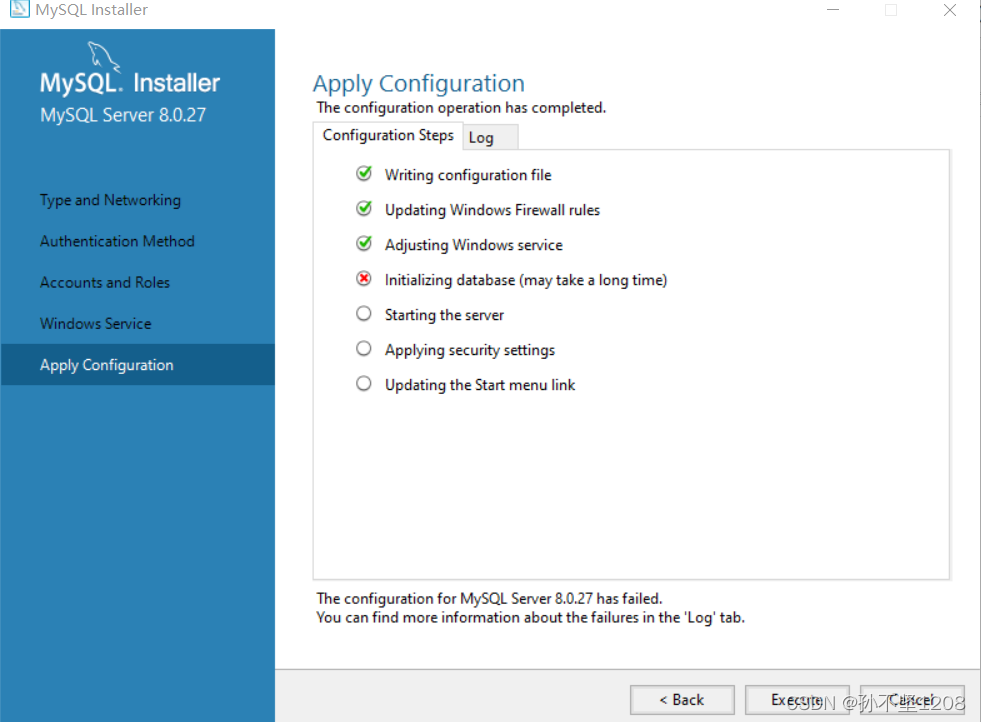
报错信息如下:
Beginning configuration step: Initializing database (may take a long time)
Attempting to run MySQL Server with --initialize-insecure option…
Starting process for MySQL Server 8.0.27…
Starting process with command: C:\software\MySQL\MySQL Server 8.0\bin\mysqld.exe --defaults-file=“C:\software\MySQL\Data\MySQL Server 8.0\my.ini” --console --initialize-insecure=on --lower-case-table-names=1…
mysqld: File ‘.\瀛欎笉鍧?208-bin.index’ not found (OS errno 2 - No such file or directory)
‘NO_ZERO_DATE’, ‘NO_ZERO_IN_DATE’ and ‘ERROR_FOR_DIVISION_BY_ZERO’ sql modes should be used with strict mode. They will be merged with strict mode in a future release.
C:\software\MySQL\MySQL Server 8.0\bin\mysqld.exe (mysqld 8.0.27) initializing of server in progress as process 11132
The newly created data directory C:\software\MySQL\Data\MySQL Server 8.0\Data\ by --initialize is unusable. You can remove it.
Aborting
C:\software\MySQL\MySQL Server 8.0\bin\mysqld.exe: Shutdown complete (mysqld 8.0.27) MySQL Community Server - GPL.
Process for mysqld, with ID 11132, was run successfully and exited with code 1.
Failed to start process for MySQL Server 8.0.27.
Database initialization failed.
Ended configuration step: Initializing database (may take a long time)
解决方案:
原因:my.ini在创建时不能编译中文然后乱码,然后读取my.ini文件时遇到乱码无法继续运行。
解决办法:将计算机名字、组名等所有中文改成纯英文(右键我的电脑属性–>查看自己的计算机名和组名是否为中文–>更改计算机名和组名–>重启计算机),卸载之前所安装的mysql server,清理注册表,卸载mysql服务,删除data数据,重启计算机使计算机改名生效,重装mysql server。